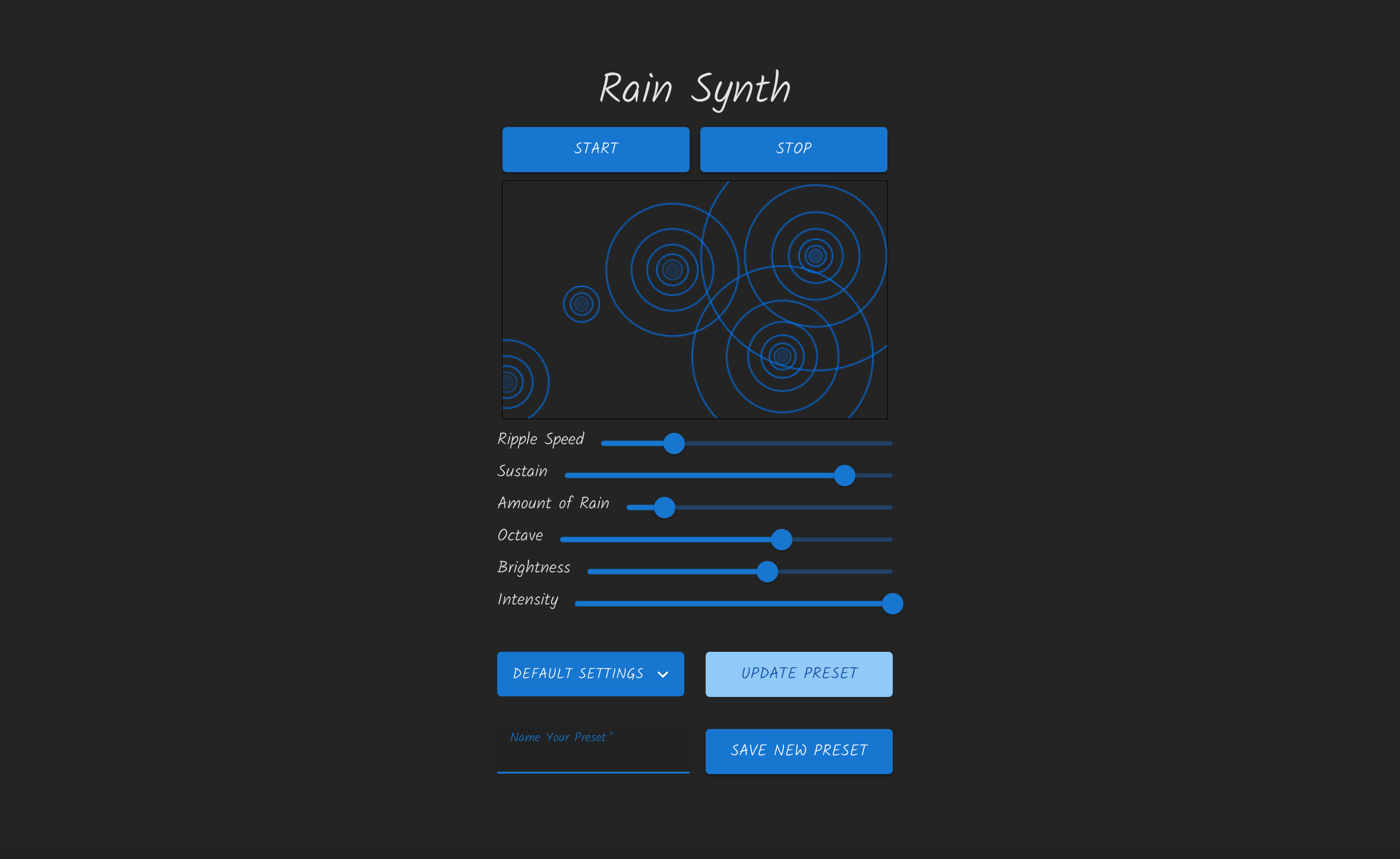
I began with a simple CRUD framework connecting my React frontend to my Rails API since I knew I wanted to be able to save the synthesizer settings. I tested this using Postman, deploying the frontend with github pages and the backend with Heroku. Once the deploy pipeline was stable for both apps, I dove into the Web Audio functionality, starting with building a simple Oscillator component that let me trigger sound by clicking a button with a couple sliders to adjust the frequency, the detune amount and a few buttons to change the waveform. Then I added a Filter component to adjust the brightness of the sound. The next step was to make it polyphonic because I wanted to allow multiple notes to make chords and drones. So I built an Oscillator class that would play a note for a given duration but would allow for multiple instances creating multiple notes.
After that, I moved into the visual part of the project, putting together a component that would render an HTML canvas and draw circles on it to represent ripples. Each time a circle is drawn, it is stored and then updated and then redrawn on each animation frame to gradually increase its radius and decrease its opacity. Once the circle's opacity passes a threshold and gets close enough to 0 (transparent) it is removed from the collection. This allows a ripple to grow and slowly dissipate. After I had single circles being triggered with a button, I added a loop that would draw "echoes" of each circle. This creates the beautiful interference patterns that are so hypnotic to me on a rainy day. Every time one of the main circles is drawn by the animation loop, 10 circles are drawn inside of it starting at the same coordinates, each with a decreased radius and transparency. To calculate this I used the golden ratio, since it is something that is so frequently used in art to appeal to our universal sense of aesthetics.
Then it was time to connect the visualizer to the sound engine. Each time a circle is drawn, a note is triggered. I removed some controls so that the notes would always sound good - I wanted them to be in the key of A major, to use a sawtooth wave, and each note has a very slight randomized amount of detune on it to create a chorus effect. The filter has been locked to a lowpass. The rest of the process was making connections - deciding how visual changes should affect the audio and vice versa. To make mapping these controls to multiple destinations easier, I made a simple function that could be used across the application. For example, It allows me to easily do things like invert the "Amount of Rain" slider so that its minimum value is actually setting a large number of milliseconds on a setInterval function. Or scale the width of the canvas to match the length of the arrays of possible note values.
export function scaleValue(inputValue, minInput, maxInput, minOutput, maxOutput, clamp = false) {
  let optionallyClampedInput = inputValue;
  if (clamp){
    if (inputValue < minInput) {
      optionallyClampedInput = minInput;
    }
    if (inputValue > maxInput) {
      optionallyClampedInput = maxInput;
    }
  }
  // scale input to 0 -> 1.
  // say current value is 30 with input range of 0 - 100.
  // (30 - 0) / 100 = .3
  // if current value is 50 in a range of 20 - 120
  // (50 - 20) / 100 = .3 as well.
  // gives us a measurement of how high in the given range the input is scaled from 0 to 1.
  const rangeOfInputValues = maxInput - minInput;
  const scaledInput = (optionallyClampedInput - minInput) / rangeOfInputValues;

  // This we can scale to output range
  // maxOutput - minOutput gives the desired range. Say 1000.
  // if we multiply our scaledInput of .3 by that output range 1000 we get 300.
  // We add minOutput in case this needs to be offset by a different output value besides 0.
  return minOutput + scaledInput * (maxOutput - minOutput);
}
Here is a look at the Oscillator class, which makes extensive use of this function to create notes.
import { scaleValue } from '../utils/mathHelpers';
import * as CONFIG from '../utils/constants';

export class Osc {

  static LOWEST_FREQUENCY = 55;

  constructor(actx, connection, baseOctave, rippleSettings, circles) {
    this.actx = actx;
    this.calculateEnvelope(rippleSettings);
    this.osc = actx.createOscillator();
    this.osc.frequency.value = this.calculateFrequency(rippleSettings, circles, baseOctave);
    // slight detune between -.1 and +.1
    this.osc.detune.value = (Math.random() / 10) - .05;
    this.osc.type = 'sawtooth';
    this.gateGain = actx.createGain();
    this.gateGain.gain.value = 0;
    this.osc.connect(this.gateGain);
    this.gateGain.connect(connection);
    this.easing = 0.1;
    this.osc.start();
    this.start();
  }
  calculateFrequency(rippleSettings, circles, baseOctave){
    // use circle coordinates to define pitch: x correspond to interval and y to octave
    const currentCircle = circles[circles.length - 1];
    const x = currentCircle.x;
    const y = currentCircle.y;
    // unison, octave, fifth, fourth, third, sixth, maj second.
    // duplicates to weight certain notes.
    // octaves range from down an octave (.5) same octave (1) to up an octave (2)
    let intervalsMajor = [1, 2, 3/2, 4/3, 5/4, 5/3, 9/8, 4/3, 3/2, 1, 2, 3/2]
    intervalsMajor = intervalsMajor.sort(function(a,b) { return a - b;});
    const octaveMultiplierList = [0.5, 1, 2];
    const widthInterval = CONFIG.CANVAS_WIDTH / intervalsMajor.length;
    const heightInterval = CONFIG.CANVAS_HEIGHT / octaveMultiplierList.length;
    // scale x and y to map to the arrays of intervals and octave multipliers. Then get the value out of the array.
    const widthIndex = Math.floor(scaleValue(x, 0, (CONFIG.CANVAS_WIDTH - widthInterval), 0, (intervalsMajor.length - 1), true));
    const interval = intervalsMajor[widthIndex];
    // inverse so that 0 on canvas height (top of canvas) is the largest index in the array.
    // round up this time and we need the .abs just because for 0 javascript gives us -0 (lol)
    const heightIndex = Math.abs(Math.ceil(scaleValue(y, 0, (CONFIG.CANVAS_HEIGHT - heightInterval), (octaveMultiplierList.length - 1), 0, false)));
    const octaveMultiplier = octaveMultiplierList[heightIndex];

    // lastly, calculate keyFreq from a default lowest frequency putting us in the key of A.
    const keyFreq = Osc.LOWEST_FREQUENCY + (Osc.LOWEST_FREQUENCY * baseOctave);
    let finalFrequency = keyFreq * interval * octaveMultiplier;
    return finalFrequency;
  }
  calculateEnvelope(rippleSettings){
    this.attack = 0.1;
    this.release = this.calculateRelease(rippleSettings);
    this.sustain = this.calculateSustain(rippleSettings);
  }
  calculateRelease(rippleSettings){
    // time values in seconds.
    // rippleSettings.decay goes from 0 -> 10 (sustain slider)
    const rippleSettingsDecayMin = 0;
    const rippleSettingsDecayMax = 10;
    const releaseMin = .2;
    const releaseMax = 5.2;
    const release = scaleValue(rippleSettings.decay, rippleSettingsDecayMin, rippleSettingsDecayMax, releaseMin, releaseMax);
    return release;
  }
  calculateSustain(rippleSettings){
    // sustain is the loudness of each note while it rings out.
    // the longer the release, the more notes at once.
    // also the more rain the more notes at once.
    // so both of these should make the sustain quieter.
    // start with .6 as the base value.
    // release is going to be between 0.2 and 5.2, displayRainSpeed is 100 - 1500
    const displayRainSpeedMin = 100;
    const displayRainSpeedMax = 1500;
    const releaseMin = 0.2;
    const releaseMax = 5.2;
    // turn both into a float from 0 to 1
    // when these are at 0 we want the max sustain of 0.6.
    // when they are at 1 we probably want something like 0.05
    const maxSustain = 0.5;
    const minSustain = 0.08;
    // so multiply them! if release and rain are both at 1 we get 1.
    // if they are both at 0 we get 0. if release is at 1 and rain is .5 we get .5
    // but we want almost 0 for min values because otherwise if one slider is at min then scaler is always 0.
    // we want other slider to still change the scaler value.
    const howMuchRain = scaleValue(parseInt(rippleSettings.displayRainSpeed), displayRainSpeedMin, displayRainSpeedMax, 0.01, 1);
    const howMuchRelease = scaleValue(this.release, releaseMin, releaseMax, 0.01, 1);
    const scaler = howMuchRain * howMuchRelease;
    // when scaler is at max 1 we want smallest sustain value 0.08 and when x is at min we want 0.6
    let sustain = scaleValue(scaler, 0, 1, maxSustain, minSustain);
    return sustain;
  }
  start(){
    let {currentTime} = this.actx;
    this.gateGain.gain.cancelScheduledValues(currentTime);
    let startEnvelopeTime = currentTime + this.easing;
    this.gateGain.gain.setValueAtTime(0, startEnvelopeTime);
    let attackToSustainLevelTime = startEnvelopeTime + this.attack + this.easing;
    this.gateGain.gain.linearRampToValueAtTime(this.sustain, attackToSustainLevelTime);
    let releaseTo0Time = attackToSustainLevelTime + this.release + this.easing;
    this.gateGain.gain.linearRampToValueAtTime(0, releaseTo0Time);
    let disconnectTime = releaseTo0Time + this.easing;
    setTimeout(()=>{
      this.osc.disconnect();
    }, (this.release * 1000) + 1000);
  }
}
Finally, I returned to the backend, creating a model to hold all the settings needed by the frontend and connecting up the create, read, edit and delete functionality. I considered adding user authentication so that presets could be saved to a particular account and only modified by the creator of the preset, but for now I wanted to allow users to try out each other's presets. In the future I may expand in this direction if there is interest.